
%22%3E%0A%3Cstop%20offset%3D%220%22%20stop-color%3D%22%237C3AED%22%2F%3E%3Cstop%20offset%3D%220.52%22%20stop-color%3D%22%23A56BFF%22%2F%3E%3Cstop%20offset%3D%221%22%20stop-color%3D%22%232B4AFF%22%2F%3E%0A%3C%2FlinearGradient%3E%0A%3CradialGradient%20id%3D%22hi%22%20cx%3D%2250%25%22%20cy%3D%2250%25%22%20r%3D%2250%25%22%3E%3Cstop%20offset%3D%220%22%20stop-color%3D%22%23ffffff%22%20stop-opacity%3D%220.30%22%2F%3E%3Cstop%20offset%3D%221%22%20stop-color%3D%22%23ffffff%22%20stop-opacity%3D%220%22%2F%3E%3C%2FradialGradient%3E%0A%3CradialGradient%20id%3D%22sh%22%20cx%3D%2250%25%22%20cy%3D%2250%25%22%20r%3D%2250%25%22%3E%3Cstop%20offset%3D%220%22%20stop-color%3D%22%230a1030%22%20stop-opacity%3D%220.26%22%2F%3E%3Cstop%20offset%3D%221%22%20stop-color%3D%22%230a1030%22%20stop-opacity%3D%220%22%2F%3E%3C%2FradialGradient%3E%0A%3ClinearGradient%20id%3D%22scrim%22%20x1%3D%220%22%20y1%3D%220%22%20x2%3D%220%22%20y2%3D%221%22%3E%3Cstop%20offset%3D%220.30%22%20stop-color%3D%22%23070d28%22%20stop-opacity%3D%220%22%2F%3E%3Cstop%20offset%3D%221%22%20stop-color%3D%22%23070d28%22%20stop-opacity%3D%220.44%22%2F%3E%3C%2FlinearGradient%3E%0A%3Cpattern%20id%3D%22dots%22%20width%3D%2232%22%20height%3D%2232%22%20patternUnits%3D%22userSpaceOnUse%22%20patternTransform%3D%22rotate(-14)%22%3E%3Ccircle%20cx%3D%222%22%20cy%3D%222%22%20r%3D%221.6%22%20fill%3D%22%23ffffff%22%20fill-opacity%3D%220.10%22%2F%3E%3C%2Fpattern%3E%0A%3Cfilter%20id%3D%22grain%22%3E%3CfeTurbulence%20type%3D%22fractalNoise%22%20baseFrequency%3D%220.9%22%20numOctaves%3D%223%22%20stitchTiles%3D%22stitch%22%2F%3E%3CfeColorMatrix%20type%3D%22saturate%22%20values%3D%220%22%2F%3E%3C%2Ffilter%3E%0A%3C%2Fdefs%3E%0A%3Crect%20width%3D%221200%22%20height%3D%22675%22%20fill%3D%22url(%23g)%22%2F%3E%0A%3Crect%20width%3D%221200%22%20height%3D%22675%22%20fill%3D%22url(%23dots)%22%2F%3E%0A%3Ccircle%20cx%3D%22350%22%20cy%3D%22180%22%20r%3D%22360%22%20fill%3D%22url(%23hi)%22%2F%3E%0A%3Ccircle%20cx%3D%22980%22%20cy%3D%22560%22%20r%3D%22320%22%20fill%3D%22url(%23sh)%22%2F%3E%0A%3Cg%20stroke%3D%22%23ffffff%22%20stroke-opacity%3D%220.18%22%20fill%3D%22none%22%20stroke-width%3D%222%22%3E%3Ccircle%20cx%3D%221015%22%20cy%3D%22150%22%20r%3D%2264%22%2F%3E%3Ccircle%20cx%3D%221015%22%20cy%3D%22150%22%20r%3D%22112%22%2F%3E%3Ccircle%20cx%3D%221015%22%20cy%3D%22150%22%20r%3D%22160%22%2F%3E%3C%2Fg%3E%0A%3Ccircle%20cx%3D%221015%22%20cy%3D%22150%22%20r%3D%2218%22%20fill%3D%22%23ffffff%22%20fill-opacity%3D%220.9%22%2F%3E%0A%3Crect%20width%3D%221200%22%20height%3D%22675%22%20filter%3D%22url(%23grain)%22%20opacity%3D%220.22%22%20style%3D%22mix-blend-mode%3Aoverlay%22%2F%3E%0A%3Crect%20width%3D%221200%22%20height%3D%22675%22%20fill%3D%22url(%23scrim)%22%2F%3E%0A%3Cg%20transform%3D%22translate(600%2096)%22%3E%3Ccircle%20cx%3D%22-26%22%20cy%3D%220%22%20r%3D%229%22%20fill%3D%22%23ffffff%22%20fill-opacity%3D%220.95%22%2F%3E%3Ccircle%20cx%3D%220%22%20cy%3D%220%22%20r%3D%229%22%20fill%3D%22%23ffffff%22%20fill-opacity%3D%220.65%22%2F%3E%3Ccircle%20cx%3D%2226%22%20cy%3D%220%22%20r%3D%229%22%20fill%3D%22%23ffffff%22%20fill-opacity%3D%220.4%22%2F%3E%3C%2Fg%3E%0A%3Ctext%20x%3D%22600%22%20y%3D%22158%22%20text-anchor%3D%22middle%22%20fill%3D%22%23ffffff%22%20fill-opacity%3D%220.92%22%20font-size%3D%2222%22%20font-weight%3D%22700%22%20letter-spacing%3D%223%22%3ECRM%3C%2Ftext%3E%0A%3Ctext%20text-anchor%3D%22middle%22%20fill%3D%22%23ffffff%22%20font-size%3D%2246%22%20font-weight%3D%22800%22%20letter-spacing%3D%22-1%22%3E%3Ctspan%20x%3D%22600%22%20y%3D%22331%22%3ESpechy's%20mobile%3C%2Ftspan%3E%3Ctspan%20x%3D%22600%22%20y%3D%22385%22%3Eapp%20is%20on%20Google%3C%2Ftspan%3E%3Ctspan%20x%3D%22600%22%20y%3D%22439%22%3EPlay%3A%20two%20apps%2C%3C%2Ftspan%3E%3Ctspan%20x%3D%22600%22%20y%3D%22493%22%3Eone%20account%3C%2Ftspan%3E%3C%2Ftext%3E%0A%3C%2Fsvg%3E)
Spechy is now on Google Play. You can follow conversations, place calls from your extension and update tickets without being at your desk. Two separate apps are live: Spechy: Çok Kanallı CRM, which carries the whole working day, and Spechy Voice, which focuses only on the phone side.
This post explains what each app does and which one suits you. It is written for existing Spechy customers; using the app requires your company to have a Spechy account and a user defined for you.
Which app does what?
They are built for different jobs and do not replace one another.
Spechy: Çok Kanallı CRM is the mobile equivalent of what you do in the panel. Conversations across every channel, contact and company records, tickets, the calendar and internal team chat, all in one app. You can place calls from it too.
Spechy Voice is an Android softphone. It only deals with calling, but it goes deeper there: multiple SIP accounts, live dashboards, transfer and call waiting. Spechy cloud PBX customers connect with one tap, and you can also use a SIP account from another provider.
For a sales rep out with customers, the first one. For an operations team handling heavy call volume, the second. Nothing stops you running both.
What does the unified inbox look like?
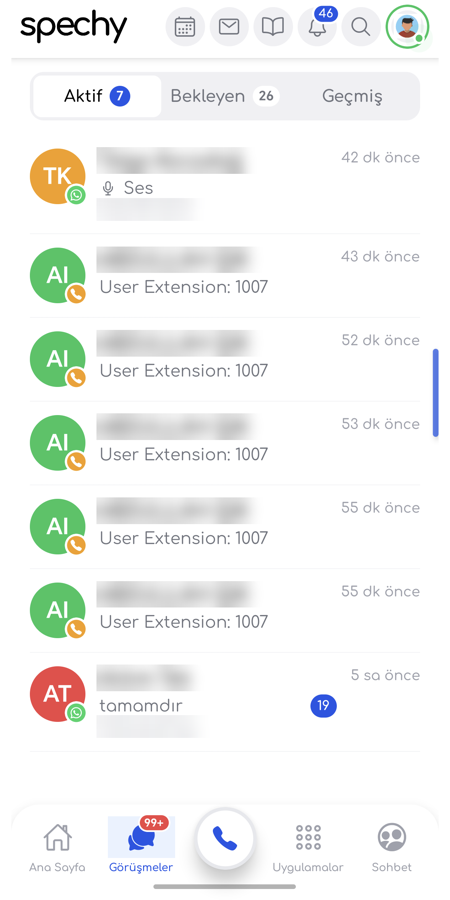
WhatsApp, Instagram, Facebook, live chat and email conversations are listed on one screen. You do not need a separate app per channel.
You get a push notification when a new message arrives. You can take over a conversation, transfer it to another agent, or close it. So mobile is not a read-only screen: the same take-over and transfer actions you perform in the panel work from the phone.
We covered why multi-channel work belongs on a single screen in The Power of Omnichannel CRM. Mobile is that same logic, off the desk.
How much of your extension travels with you?
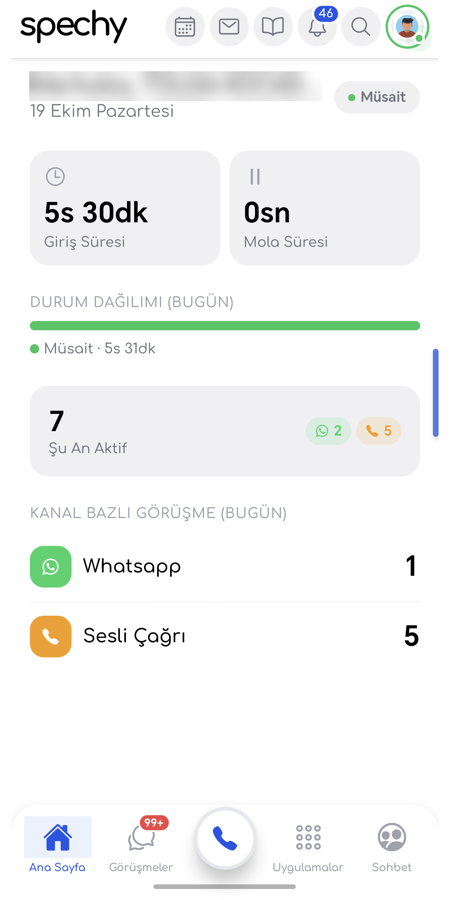
All of it. You can place calls from your extension and answer incoming ones.
The detail that matters: you can see and answer an incoming call from the lock screen. The app does not need to be open first. When the call ends, you can enter the call result code and a note from the phone.
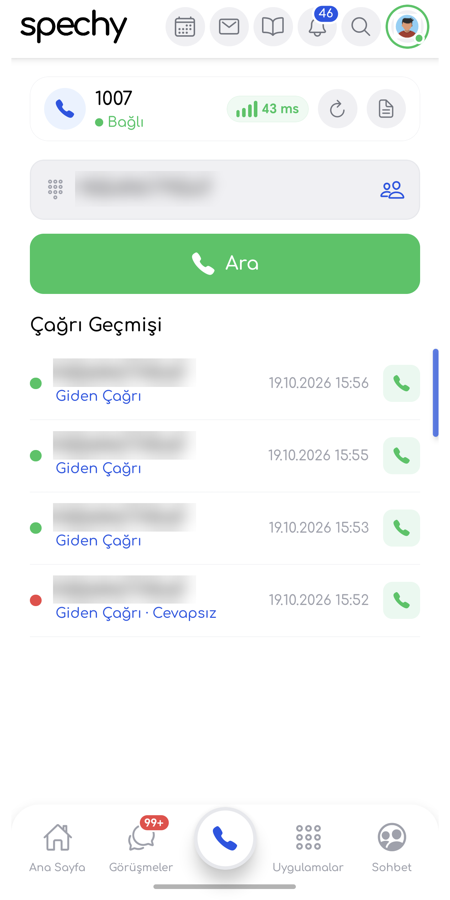
That last one is more important than it looks. A call with no result code shows up incomplete in reporting, and the numbers do not add up at month end. If an agent can enter the code while away from the desk, the report stays accurate without dividing the team into desk and field. We went through which metrics matter and why in our call centre metrics guide.
Does a conversation started on desktop continue on mobile?
It does. A conversation you take over on the computer appears on mobile immediately.
This arrived with the 24 October release and it answers the most common objection to mobile use: that handovers get confused when part of the team is on a phone and part is in the panel. They do not, because both sides read the same conversation state.
Can you manage channel settings and WhatsApp templates from the phone?
Yes. Channel settings moved into the app with the 24 October release.
You can connect and edit Facebook, Instagram and WhatsApp accounts from the app. Working hours, automatic messages, AI settings and the comment filter are all configurable from the phone.
The same applies to WhatsApp templates: you can list them, create a new one (including buttons, media, carousel and verification code), edit them, and add a language to a template. The same release added the WhatsApp QR code, voice calling and group permissions.
Most customers assume template creation is desktop-only. Not any more.
Can you reach customer and ticket records on mobile?
You can. Contact and company records are available with their full history.
You can view and update tickets, add comments, and filter by status, priority and assignee. You can search the knowledge base and find the answer you need. The calendar handles appointments and tasks, and you can message colleagues from inside the app.
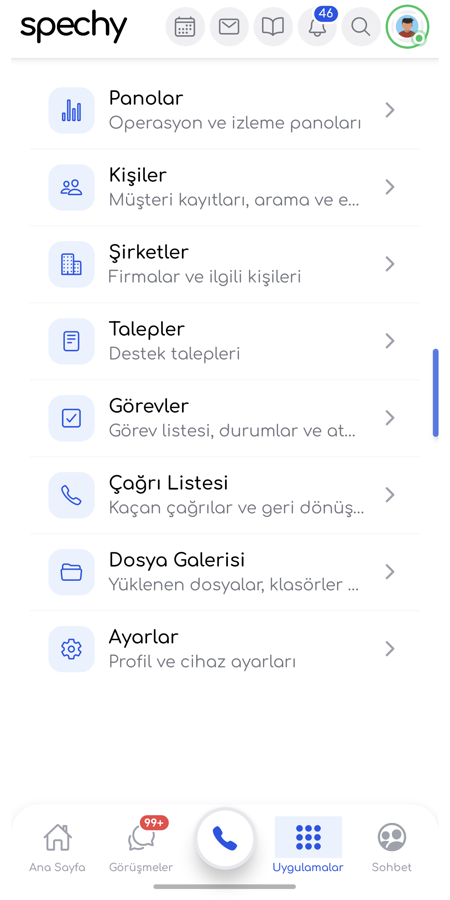
Global search is in the app as well: you search customers, tickets and conversations from one box. On a busy day that is usually the habit that saves the most time.
What exactly does Spechy Voice offer?
Spechy Voice is a standalone softphone working on the SIP side.
It supports WSS, UDP, TCP and TLS. Several accounts can stay registered at once, and you choose which one an outgoing call uses. When you sign in with your Spechy Voice account, the extension assigned to you connects automatically.
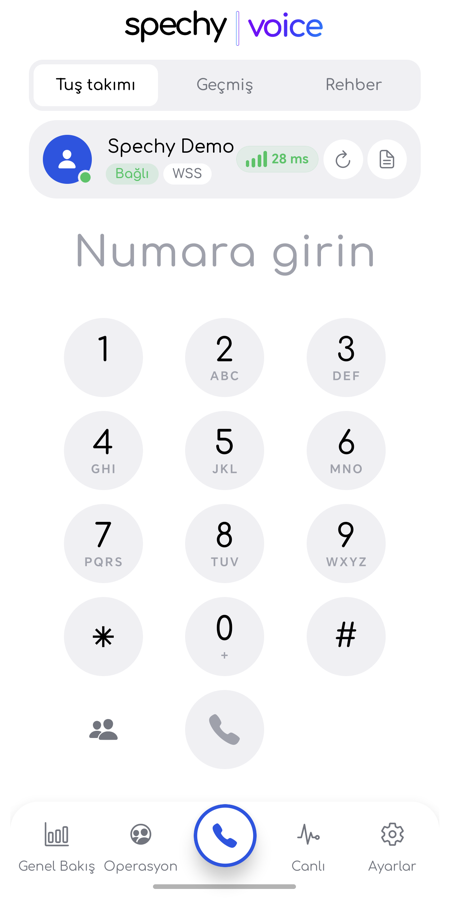
During a call you have hold, mute, speaker, keypad (DTMF), transfer and call waiting. There is call history and quick dial from the directory. Incoming calls arrive full screen even when the app is closed and the screen is locked.
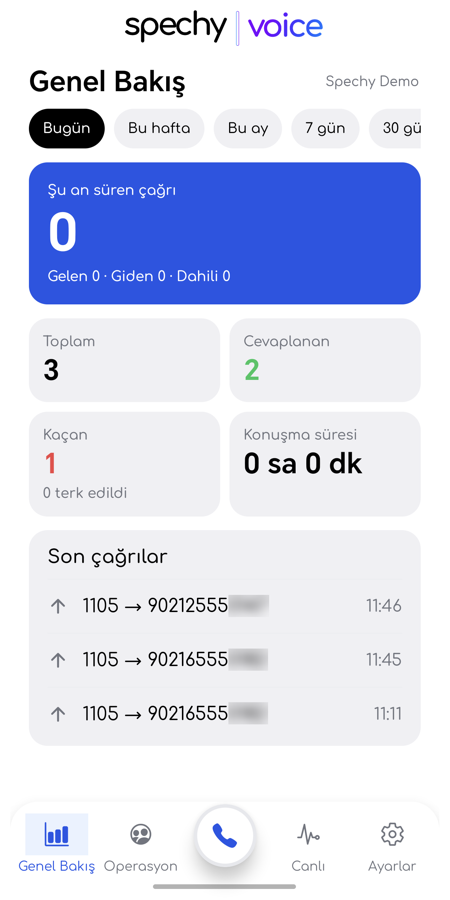
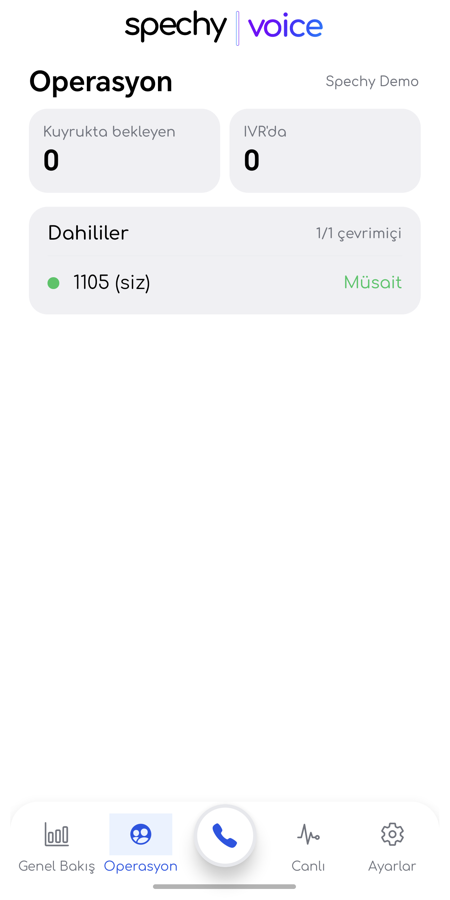
The live dashboards, which open according to your permissions, are what serve the operations side: Overview shows call summaries, Operations shows queue, IVR and extension status, and Live shows calls in progress. For a team lead that means not having to walk back to a desk to see the board.
What about security and languages?
Sign-in is protected by two-step verification. That applies to both apps.
The interface is available in eight languages: Turkish, English, German, French, Russian, Spanish, Arabic and Uzbek. For businesses with teams in different countries, or serving customers in several languages, an agent can work in their own.
How do you get started?
Download the app from Google Play and sign in with your existing Spechy credentials. There is no separate setup and no new account.
The one step not to skip after installing is the notification permission. Without it, new message alerts and the lock-screen incoming call will not work, and the app looks broken. If you tried the app earlier and had trouble with notifications, the 24 October release fixed a crash in the notification received while the app was closed; update and try again.
The apps are currently available for Android. We are not sharing a date for iOS.
View Spechy: Çok Kanallı CRM on Google Play ↗
Frequently asked questions
Is there an extra charge for using the app?
The apps work with your existing Spechy account. Your plan and user definitions apply exactly as they do in the panel; no separate mobile licence is issued.
Is there an iOS version?
Not at the moment. Both apps are available for Android. We are not sharing a date for iOS.
Can I use Spechy Voice with my own PBX?
Yes. You can add a SIP account from any SIP provider or PBX. Spechy cloud PBX customers connect with a single tap.
Do I need to use both apps?
No. If you run the whole working day from mobile, the Çok Kanallı CRM app is enough. If you focus on calling, or work with several SIP accounts, Spechy Voice is the better fit.
Will I lose a conversation I opened on the computer?
You will not. A conversation you take over on the computer appears on mobile immediately; both sides read the same conversation state.
Can I receive an incoming call while the app is closed?
You can. Incoming calls arrive full screen while the app is closed and the screen is locked. This requires the notification permission to be granted.
Which languages can I use?
Turkish, English, German, French, Russian, Spanish, Arabic and Uzbek.
A closing thought
The real gain from a mobile app is not access from anywhere. The real gain is that the record stays complete. A team that skips the result code because nobody is at a desk, plans to write the note later and forgets, and tries to reconstruct a call in the evening, cannot trust its own data at month end.
The app in your pocket closes that gap. Whether the report is accurate stops depending on where the agent was standing.
%22%3E%0A%3Cstop%20offset%3D%220%22%20stop-color%3D%22%237C3AED%22%2F%3E%3Cstop%20offset%3D%220.52%22%20stop-color%3D%22%23A56BFF%22%2F%3E%3Cstop%20offset%3D%221%22%20stop-color%3D%22%232B4AFF%22%2F%3E%0A%3C%2FlinearGradient%3E%0A%3CradialGradient%20id%3D%22hi%22%20cx%3D%2250%25%22%20cy%3D%2250%25%22%20r%3D%2250%25%22%3E%3Cstop%20offset%3D%220%22%20stop-color%3D%22%23ffffff%22%20stop-opacity%3D%220.30%22%2F%3E%3Cstop%20offset%3D%221%22%20stop-color%3D%22%23ffffff%22%20stop-opacity%3D%220%22%2F%3E%3C%2FradialGradient%3E%0A%3CradialGradient%20id%3D%22sh%22%20cx%3D%2250%25%22%20cy%3D%2250%25%22%20r%3D%2250%25%22%3E%3Cstop%20offset%3D%220%22%20stop-color%3D%22%230a1030%22%20stop-opacity%3D%220.26%22%2F%3E%3Cstop%20offset%3D%221%22%20stop-color%3D%22%230a1030%22%20stop-opacity%3D%220%22%2F%3E%3C%2FradialGradient%3E%0A%3ClinearGradient%20id%3D%22scrim%22%20x1%3D%220%22%20y1%3D%220%22%20x2%3D%220%22%20y2%3D%221%22%3E%3Cstop%20offset%3D%220.30%22%20stop-color%3D%22%23070d28%22%20stop-opacity%3D%220%22%2F%3E%3Cstop%20offset%3D%221%22%20stop-color%3D%22%23070d28%22%20stop-opacity%3D%220.44%22%2F%3E%3C%2FlinearGradient%3E%0A%3Cpattern%20id%3D%22dots%22%20width%3D%2232%22%20height%3D%2232%22%20patternUnits%3D%22userSpaceOnUse%22%20patternTransform%3D%22rotate(-15)%22%3E%3Ccircle%20cx%3D%222%22%20cy%3D%222%22%20r%3D%221.6%22%20fill%3D%22%23ffffff%22%20fill-opacity%3D%220.10%22%2F%3E%3C%2Fpattern%3E%0A%3Cfilter%20id%3D%22grain%22%3E%3CfeTurbulence%20type%3D%22fractalNoise%22%20baseFrequency%3D%220.9%22%20numOctaves%3D%223%22%20stitchTiles%3D%22stitch%22%2F%3E%3CfeColorMatrix%20type%3D%22saturate%22%20values%3D%220%22%2F%3E%3C%2Ffilter%3E%0A%3C%2Fdefs%3E%0A%3Crect%20width%3D%221200%22%20height%3D%22675%22%20fill%3D%22url(%23g)%22%2F%3E%0A%3Crect%20width%3D%221200%22%20height%3D%22675%22%20fill%3D%22url(%23dots)%22%2F%3E%0A%3Ccircle%20cx%3D%22350%22%20cy%3D%22180%22%20r%3D%22360%22%20fill%3D%22url(%23hi)%22%2F%3E%0A%3Ccircle%20cx%3D%22980%22%20cy%3D%22560%22%20r%3D%22320%22%20fill%3D%22url(%23sh)%22%2F%3E%0A%3Cg%20stroke%3D%22%23ffffff%22%20stroke-opacity%3D%220.18%22%20fill%3D%22none%22%20stroke-width%3D%222%22%3E%3Ccircle%20cx%3D%221015%22%20cy%3D%22150%22%20r%3D%2264%22%2F%3E%3Ccircle%20cx%3D%221015%22%20cy%3D%22150%22%20r%3D%22112%22%2F%3E%3Ccircle%20cx%3D%221015%22%20cy%3D%22150%22%20r%3D%22160%22%2F%3E%3C%2Fg%3E%0A%3Ccircle%20cx%3D%221015%22%20cy%3D%22150%22%20r%3D%2218%22%20fill%3D%22%23ffffff%22%20fill-opacity%3D%220.9%22%2F%3E%0A%3Crect%20width%3D%221200%22%20height%3D%22675%22%20filter%3D%22url(%23grain)%22%20opacity%3D%220.22%22%20style%3D%22mix-blend-mode%3Aoverlay%22%2F%3E%0A%3Crect%20width%3D%221200%22%20height%3D%22675%22%20fill%3D%22url(%23scrim)%22%2F%3E%0A%3Cg%20transform%3D%22translate(600%2096)%22%3E%3Ccircle%20cx%3D%22-26%22%20cy%3D%220%22%20r%3D%229%22%20fill%3D%22%23ffffff%22%20fill-opacity%3D%220.95%22%2F%3E%3Ccircle%20cx%3D%220%22%20cy%3D%220%22%20r%3D%229%22%20fill%3D%22%23ffffff%22%20fill-opacity%3D%220.65%22%2F%3E%3Ccircle%20cx%3D%2226%22%20cy%3D%220%22%20r%3D%229%22%20fill%3D%22%23ffffff%22%20fill-opacity%3D%220.4%22%2F%3E%3C%2Fg%3E%0A%3Ctext%20x%3D%22600%22%20y%3D%22158%22%20text-anchor%3D%22middle%22%20fill%3D%22%23ffffff%22%20fill-opacity%3D%220.92%22%20font-size%3D%2222%22%20font-weight%3D%22700%22%20letter-spacing%3D%223%22%3ECRM%3C%2Ftext%3E%0A%3Ctext%20text-anchor%3D%22middle%22%20fill%3D%22%23ffffff%22%20font-size%3D%2246%22%20font-weight%3D%22800%22%20letter-spacing%3D%22-1%22%3E%3Ctspan%20x%3D%22600%22%20y%3D%22331%22%3EIs%20CRM%20a%20Success%3C%2Ftspan%3E%3Ctspan%20x%3D%22600%22%20y%3D%22385%22%3Eor%20Failure%3F%3C%2Ftspan%3E%3Ctspan%20x%3D%22600%22%20y%3D%22439%22%3EUnveiling%20the%3C%2Ftspan%3E%3Ctspan%20x%3D%22600%22%20y%3D%22493%22%3ETruth%3C%2Ftspan%3E%3C%2Ftext%3E%0A%3C%2Fsvg%3E)
%22%3E%0A%3Cstop%20offset%3D%220%22%20stop-color%3D%22%237C3AED%22%2F%3E%3Cstop%20offset%3D%220.52%22%20stop-color%3D%22%23A56BFF%22%2F%3E%3Cstop%20offset%3D%221%22%20stop-color%3D%22%232B4AFF%22%2F%3E%0A%3C%2FlinearGradient%3E%0A%3CradialGradient%20id%3D%22hi%22%20cx%3D%2250%25%22%20cy%3D%2250%25%22%20r%3D%2250%25%22%3E%3Cstop%20offset%3D%220%22%20stop-color%3D%22%23ffffff%22%20stop-opacity%3D%220.30%22%2F%3E%3Cstop%20offset%3D%221%22%20stop-color%3D%22%23ffffff%22%20stop-opacity%3D%220%22%2F%3E%3C%2FradialGradient%3E%0A%3CradialGradient%20id%3D%22sh%22%20cx%3D%2250%25%22%20cy%3D%2250%25%22%20r%3D%2250%25%22%3E%3Cstop%20offset%3D%220%22%20stop-color%3D%22%230a1030%22%20stop-opacity%3D%220.26%22%2F%3E%3Cstop%20offset%3D%221%22%20stop-color%3D%22%230a1030%22%20stop-opacity%3D%220%22%2F%3E%3C%2FradialGradient%3E%0A%3ClinearGradient%20id%3D%22scrim%22%20x1%3D%220%22%20y1%3D%220%22%20x2%3D%220%22%20y2%3D%221%22%3E%3Cstop%20offset%3D%220.30%22%20stop-color%3D%22%23070d28%22%20stop-opacity%3D%220%22%2F%3E%3Cstop%20offset%3D%221%22%20stop-color%3D%22%23070d28%22%20stop-opacity%3D%220.44%22%2F%3E%3C%2FlinearGradient%3E%0A%3Cpattern%20id%3D%22dots%22%20width%3D%2232%22%20height%3D%2232%22%20patternUnits%3D%22userSpaceOnUse%22%20patternTransform%3D%22rotate(-8)%22%3E%3Ccircle%20cx%3D%222%22%20cy%3D%222%22%20r%3D%221.6%22%20fill%3D%22%23ffffff%22%20fill-opacity%3D%220.10%22%2F%3E%3C%2Fpattern%3E%0A%3Cfilter%20id%3D%22grain%22%3E%3CfeTurbulence%20type%3D%22fractalNoise%22%20baseFrequency%3D%220.9%22%20numOctaves%3D%223%22%20stitchTiles%3D%22stitch%22%2F%3E%3CfeColorMatrix%20type%3D%22saturate%22%20values%3D%220%22%2F%3E%3C%2Ffilter%3E%0A%3C%2Fdefs%3E%0A%3Crect%20width%3D%221200%22%20height%3D%22675%22%20fill%3D%22url(%23g)%22%2F%3E%0A%3Crect%20width%3D%221200%22%20height%3D%22675%22%20fill%3D%22url(%23dots)%22%2F%3E%0A%3Ccircle%20cx%3D%22350%22%20cy%3D%22180%22%20r%3D%22360%22%20fill%3D%22url(%23hi)%22%2F%3E%0A%3Ccircle%20cx%3D%22980%22%20cy%3D%22560%22%20r%3D%22320%22%20fill%3D%22url(%23sh)%22%2F%3E%0A%3Cg%20stroke%3D%22%23ffffff%22%20stroke-opacity%3D%220.18%22%20fill%3D%22none%22%20stroke-width%3D%222%22%3E%3Ccircle%20cx%3D%221015%22%20cy%3D%22150%22%20r%3D%2264%22%2F%3E%3Ccircle%20cx%3D%221015%22%20cy%3D%22150%22%20r%3D%22112%22%2F%3E%3Ccircle%20cx%3D%221015%22%20cy%3D%22150%22%20r%3D%22160%22%2F%3E%3C%2Fg%3E%0A%3Ccircle%20cx%3D%221015%22%20cy%3D%22150%22%20r%3D%2218%22%20fill%3D%22%23ffffff%22%20fill-opacity%3D%220.9%22%2F%3E%0A%3Crect%20width%3D%221200%22%20height%3D%22675%22%20filter%3D%22url(%23grain)%22%20opacity%3D%220.22%22%20style%3D%22mix-blend-mode%3Aoverlay%22%2F%3E%0A%3Crect%20width%3D%221200%22%20height%3D%22675%22%20fill%3D%22url(%23scrim)%22%2F%3E%0A%3Cg%20transform%3D%22translate(600%2096)%22%3E%3Ccircle%20cx%3D%22-26%22%20cy%3D%220%22%20r%3D%229%22%20fill%3D%22%23ffffff%22%20fill-opacity%3D%220.95%22%2F%3E%3Ccircle%20cx%3D%220%22%20cy%3D%220%22%20r%3D%229%22%20fill%3D%22%23ffffff%22%20fill-opacity%3D%220.65%22%2F%3E%3Ccircle%20cx%3D%2226%22%20cy%3D%220%22%20r%3D%229%22%20fill%3D%22%23ffffff%22%20fill-opacity%3D%220.4%22%2F%3E%3C%2Fg%3E%0A%3Ctext%20x%3D%22600%22%20y%3D%22158%22%20text-anchor%3D%22middle%22%20fill%3D%22%23ffffff%22%20fill-opacity%3D%220.92%22%20font-size%3D%2222%22%20font-weight%3D%22700%22%20letter-spacing%3D%223%22%3ECRM%3C%2Ftext%3E%0A%3Ctext%20text-anchor%3D%22middle%22%20fill%3D%22%23ffffff%22%20font-size%3D%2246%22%20font-weight%3D%22800%22%20letter-spacing%3D%22-1%22%3E%3Ctspan%20x%3D%22600%22%20y%3D%22331%22%3EWhy%20is%20Digital%3C%2Ftspan%3E%3Ctspan%20x%3D%22600%22%20y%3D%22385%22%3ECustomer%3C%2Ftspan%3E%3Ctspan%20x%3D%22600%22%20y%3D%22439%22%3EExperience%3C%2Ftspan%3E%3Ctspan%20x%3D%22600%22%20y%3D%22493%22%3EImportant%3F%3C%2Ftspan%3E%3C%2Ftext%3E%0A%3C%2Fsvg%3E)
%22%3E%0A%3Cstop%20offset%3D%220%22%20stop-color%3D%22%237C3AED%22%2F%3E%3Cstop%20offset%3D%220.52%22%20stop-color%3D%22%23A56BFF%22%2F%3E%3Cstop%20offset%3D%221%22%20stop-color%3D%22%232B4AFF%22%2F%3E%0A%3C%2FlinearGradient%3E%0A%3CradialGradient%20id%3D%22hi%22%20cx%3D%2250%25%22%20cy%3D%2250%25%22%20r%3D%2250%25%22%3E%3Cstop%20offset%3D%220%22%20stop-color%3D%22%23ffffff%22%20stop-opacity%3D%220.30%22%2F%3E%3Cstop%20offset%3D%221%22%20stop-color%3D%22%23ffffff%22%20stop-opacity%3D%220%22%2F%3E%3C%2FradialGradient%3E%0A%3CradialGradient%20id%3D%22sh%22%20cx%3D%2250%25%22%20cy%3D%2250%25%22%20r%3D%2250%25%22%3E%3Cstop%20offset%3D%220%22%20stop-color%3D%22%230a1030%22%20stop-opacity%3D%220.26%22%2F%3E%3Cstop%20offset%3D%221%22%20stop-color%3D%22%230a1030%22%20stop-opacity%3D%220%22%2F%3E%3C%2FradialGradient%3E%0A%3ClinearGradient%20id%3D%22scrim%22%20x1%3D%220%22%20y1%3D%220%22%20x2%3D%220%22%20y2%3D%221%22%3E%3Cstop%20offset%3D%220.30%22%20stop-color%3D%22%23070d28%22%20stop-opacity%3D%220%22%2F%3E%3Cstop%20offset%3D%221%22%20stop-color%3D%22%23070d28%22%20stop-opacity%3D%220.44%22%2F%3E%3C%2FlinearGradient%3E%0A%3Cpattern%20id%3D%22dots%22%20width%3D%2232%22%20height%3D%2232%22%20patternUnits%3D%22userSpaceOnUse%22%20patternTransform%3D%22rotate(6)%22%3E%3Ccircle%20cx%3D%222%22%20cy%3D%222%22%20r%3D%221.6%22%20fill%3D%22%23ffffff%22%20fill-opacity%3D%220.10%22%2F%3E%3C%2Fpattern%3E%0A%3Cfilter%20id%3D%22grain%22%3E%3CfeTurbulence%20type%3D%22fractalNoise%22%20baseFrequency%3D%220.9%22%20numOctaves%3D%223%22%20stitchTiles%3D%22stitch%22%2F%3E%3CfeColorMatrix%20type%3D%22saturate%22%20values%3D%220%22%2F%3E%3C%2Ffilter%3E%0A%3C%2Fdefs%3E%0A%3Crect%20width%3D%221200%22%20height%3D%22675%22%20fill%3D%22url(%23g)%22%2F%3E%0A%3Crect%20width%3D%221200%22%20height%3D%22675%22%20fill%3D%22url(%23dots)%22%2F%3E%0A%3Ccircle%20cx%3D%22350%22%20cy%3D%22180%22%20r%3D%22360%22%20fill%3D%22url(%23hi)%22%2F%3E%0A%3Ccircle%20cx%3D%22980%22%20cy%3D%22560%22%20r%3D%22320%22%20fill%3D%22url(%23sh)%22%2F%3E%0A%3Cg%20stroke%3D%22%23ffffff%22%20stroke-opacity%3D%220.18%22%20fill%3D%22none%22%20stroke-width%3D%222%22%3E%3Ccircle%20cx%3D%221015%22%20cy%3D%22150%22%20r%3D%2264%22%2F%3E%3Ccircle%20cx%3D%221015%22%20cy%3D%22150%22%20r%3D%22112%22%2F%3E%3Ccircle%20cx%3D%221015%22%20cy%3D%22150%22%20r%3D%22160%22%2F%3E%3C%2Fg%3E%0A%3Ccircle%20cx%3D%221015%22%20cy%3D%22150%22%20r%3D%2218%22%20fill%3D%22%23ffffff%22%20fill-opacity%3D%220.9%22%2F%3E%0A%3Crect%20width%3D%221200%22%20height%3D%22675%22%20filter%3D%22url(%23grain)%22%20opacity%3D%220.22%22%20style%3D%22mix-blend-mode%3Aoverlay%22%2F%3E%0A%3Crect%20width%3D%221200%22%20height%3D%22675%22%20fill%3D%22url(%23scrim)%22%2F%3E%0A%3Cg%20transform%3D%22translate(600%2096)%22%3E%3Ccircle%20cx%3D%22-26%22%20cy%3D%220%22%20r%3D%229%22%20fill%3D%22%23ffffff%22%20fill-opacity%3D%220.95%22%2F%3E%3Ccircle%20cx%3D%220%22%20cy%3D%220%22%20r%3D%229%22%20fill%3D%22%23ffffff%22%20fill-opacity%3D%220.65%22%2F%3E%3Ccircle%20cx%3D%2226%22%20cy%3D%220%22%20r%3D%229%22%20fill%3D%22%23ffffff%22%20fill-opacity%3D%220.4%22%2F%3E%3C%2Fg%3E%0A%3Ctext%20x%3D%22600%22%20y%3D%22158%22%20text-anchor%3D%22middle%22%20fill%3D%22%23ffffff%22%20fill-opacity%3D%220.92%22%20font-size%3D%2222%22%20font-weight%3D%22700%22%20letter-spacing%3D%223%22%3ECRM%3C%2Ftext%3E%0A%3Ctext%20text-anchor%3D%22middle%22%20fill%3D%22%23ffffff%22%20font-size%3D%2246%22%20font-weight%3D%22800%22%20letter-spacing%3D%22-1%22%3E%3Ctspan%20x%3D%22600%22%20y%3D%22331%22%3EExamples%20of%3C%2Ftspan%3E%3Ctspan%20x%3D%22600%22%20y%3D%22385%22%3ECustomer%3C%2Ftspan%3E%3Ctspan%20x%3D%22600%22%20y%3D%22439%22%3EExperience%3C%2Ftspan%3E%3Ctspan%20x%3D%22600%22%20y%3D%22493%22%3EPersonalization%3C%2Ftspan%3E%3C%2Ftext%3E%0A%3C%2Fsvg%3E)